User's Guide

Paper
To display:
- [User Box]
- [System]
- [External Memory]
- Select the file
- [Print]
- [Paper]
- [Print]
- Select the file
- [External Memory]
- [System]
Select a paper size and type and print a file.
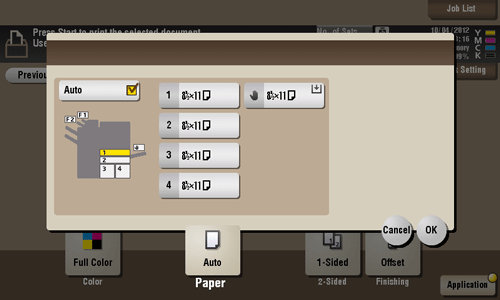
Settings | Description |
|---|---|
[Auto] | Tap this button to automatically select optimum sized paper for the original before printing. |
[1] - [4] | Specify paper for printing. |
[ | Tap this button to print onto the paper loaded into the Bypass Tray. |
[L] | Tap this button to print onto the paper loaded into the Large Capacity Unit |


To load paper into the Large Capacity Unit, the optional Large Capacity Unit is required.