User's Guide

Configuring settings for display in flash view
To display Web Connection in the flash view, enable the TCP Socket (ASCII Mode) of this machine.
In the administrator mode, select [Network] - [TCP Socket Setting], then configure the following settings.
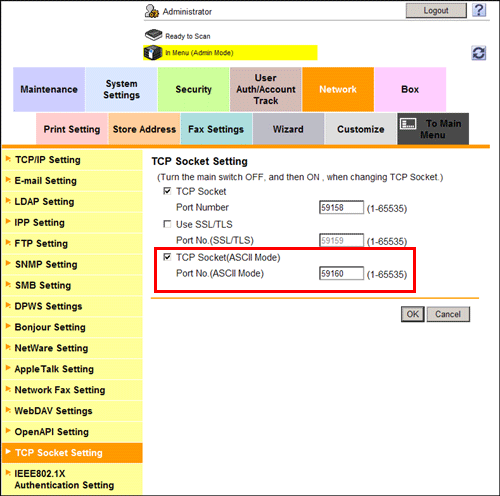
Settings | Description |
|---|---|
[TCP Socket(ASCII Mode)] | Select this check box to use TCP Socket (ASCII Mode). [ON] (selected) is specified by default. |
[Port No.(ASCII Mode)] | If necessary, change the port number of TCP Socket (ASCII Mode). Normally, you can use the original port number. [59160] is specified by default. |

For details on how to enable the flash view, refer to Here.